

In today’s digital landscape, understanding The Basics of Hacking and Penetration Testing is more important than ever. With cyber threats evolving rapidly, professionals in cybersecurity need a solid foundation in ethical hacking and penetration testing to protect systems and networks. Whether you’re a student exploring cybersecurity laptops, a gamer interested in secure setups, or someone building an AI server for advanced simulations, grasping these basics empowers you to think like an attacker to better defend against real-world risks.
The Basics Of Hacking And Penetration Testing revolves around ethical practices, where ‘hacking’ means authorized testing to uncover vulnerabilities. Penetration testing, or pentesting, simulates attacks to evaluate security postures. In 2026, with rising incidents of data breaches, these skills are in high demand for careers in cybersecurity. We recommend starting with a dedicated machine like a student laptop with TPM 2.0, ample DDR5 RAM, and NVMe SSD storage to run virtual machines smoothly.
For those setting up a home lab, check out our guide on how to choose the best laptop for cyber security students. It’s perfect for running tools like Kali Linux without compromising your main system. This post will break down the core concepts, tools, and best practices to get you started safely and legally.
What is Ethical Hacking?
Ethical hacking, also known as white-hat hacking, involves using the same techniques as malicious hackers but with permission to improve security. The goal is to identify weaknesses before bad actors exploit them. In 2026, ethical hackers use frameworks like OWASP and MITRE ATT&CK to structure their assessments.
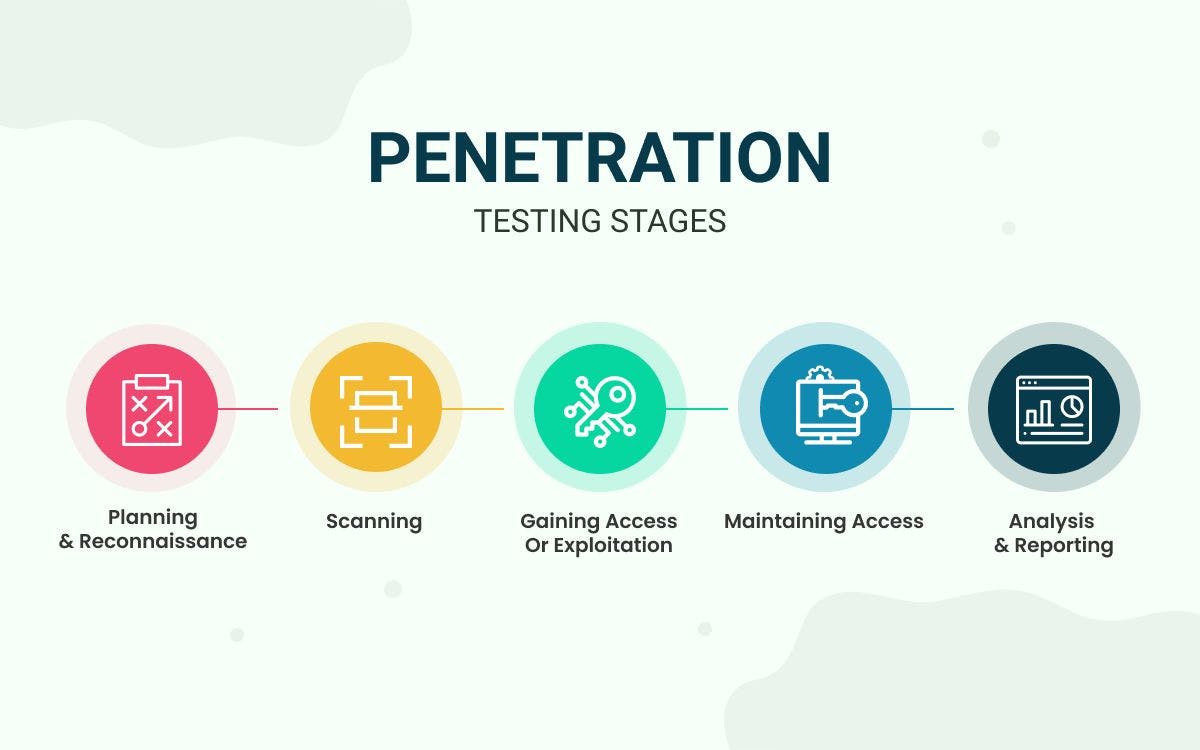
Key phases include reconnaissance, scanning, gaining access, maintaining access, and covering tracks—but ethically, you report findings instead of exploiting them. For hardware, you’ll want a cybersecurity PC with Wi-Fi 6E for wireless testing and an RTX GPU if simulating complex attacks. Students can use mini PCs for portable labs, ensuring good cooling to handle intensive scans.
Practical tip: Always obtain written permission. We see many beginners jump in without this, leading to legal issues. Start with platforms like Hack The Box or TryHackMe for safe practice.
Understanding Penetration Testing Basics
Penetration testing is a structured process mimicking real cyberattacks. It starts with passive reconnaissance—gathering info from public sources like WHOIS or Google dorking—then active scanning with tools like Nmap.
Next, vulnerability assessment using Nessus or OpenVAS, followed by exploitation with Metasploit. Post-exploitation involves privilege escalation and pivoting. In 2026, AI-enhanced pentesting is emerging, so consider AI servers with NPUs for automated vulnerability detection.
For your setup, a gaming PC with high RAM (32GB+) excels here, allowing multiple VMs for isolated testing. Link to our blog for more cybersecurity insights.
Essential Tools for The Basics of Hacking and Penetration Testing
- Nmap: Network discovery and port scanning. Run it on a laptop with strong network adapters.
- Wireshark: Packet analysis—needs good CPU for live captures.
- Metasploit Framework: Exploitation suite; pair with NVMe SSD for fast payloads.
- Burp Suite: Web app testing, ideal on mini PCs for proxying traffic.
- John the Ripper/Hashcat: Password cracking; RTX GPUs accelerate this significantly.
Install these on Kali Linux, a pentesting distro. For hardware, prioritize portability in student laptops and power in AI servers. Explore mini PCs for compact labs.
Setting Up a Pentesting Lab
Create a virtual lab using VirtualBox or VMware on your cybersecurity hardware. Isolate networks with VLANs or host-only adapters. Use vulnerable VMs like Metasploitable for practice.
Hardware tips: 16GB+ RAM minimum, Intel i7/AMD Ryzen 7, SSD for quick boots. Gaming PCs shine with discrete GPUs for GPU-accelerated cracking. Check our guide on mini PCs for AI, adaptable for pentesting.
Warning: Never test on production systems or without permission. Use cloud labs like AWS for scalability.
Legal and Ethical Considerations in 2026
Laws like the Computer Fraud and Abuse Act (CFAA) in the US govern hacking. Always get authorization via contracts. Certifications like CEH or OSCP validate your skills ethically.
In 2026, focus on bug bounties from HackerOne. For students, university labs provide safe environments. Tie this to secure home networks—see securing your home WiFi.
Getting Hands-On: Next Steps for Beginners
Enroll in free courses on Coursera or Cybrary. Practice daily with CTFs. Build a portfolio of reports. Hardware-wise, invest in a laptop from our reviews section.
Final Thoughts
Mastering The Basics of Hacking and Penetration Testing opens doors in cybersecurity. Start small, stay ethical, and equip yourself with the right hardware like student laptops or mini PCs. In 2026, these skills are vital. Dive deeper with our related posts and build your expertise today.
FAQs
What is the difference between hacking and penetration testing?
Hacking is broad; pentesting is a formal, authorized process with reporting.
Is ethical hacking legal?
Yes, with permission. Unauthorized access is illegal.
What hardware is best for beginners in The Basics of Hacking and Penetration Testing?
Laptops with 16GB RAM, SSD, and Wi-Fi 6E for VMs and scanning.
How do I start practicing The Basics of Hacking and Penetration Testing safely?
Use virtual labs and platforms like TryHackMe.
Can gaming PCs be used for penetration testing?
Absolutely—their GPUs and RAM are perfect for cracking and simulations.



Write Your Review
No reviews yet. Be the first to share your experience!