

In today’s connected world, smart home devices like cameras, lights, thermostats, and voice assistants demand a reliable network backbone. The best router for smart home devices ensures seamless connectivity for dozens of IoT gadgets without lag or dropouts. With cyber threats on the rise, prioritizing routers with robust security is essential for protecting your smart ecosystem.
Our experts tested 15 top Best Router For Smart Home Devices from KeepConnect, TP-Link, ASUS and more, focusing on real-world performance with smart home setups. Whether you’re expanding your home automation or securing a multi-device network, these picks deliver. For more options in this category, check our router wifi collection.

Pros
- Superior multi-device performance with WiFi 6 technology
- Strong signal strength and coverage via beamforming
- User-friendly app-based setup and management
- Robust security features including WPA3
- Easy expansion with EasyMesh
Cons
- Requires a separate modem for internet connection
- Performance can vary based on distance and obstacles
- Does not support the 6 GHz band
The TP-Link Archer AX21 is a dual-band WiFi 6 router designed for modern homes with multiple connected devices. It delivers AX1800 speeds up to 1.8 Gbps, making it perfect for households streaming 4K video, gaming online, or managing smart home ecosystems without lag.
Standout features include OFDMA and MU-MIMO for efficient data handling across many devices, beamforming with four antennas for focused coverage, and EasyMesh compatibility for expanding to a whole-home network. Real-world performance shines in busy environments, supporting seamless operation for families, while the Tether app simplifies setup and parental controls add family-friendly management.
Build quality is solid with a compact design that fits easily into any setup, backed by TP-Link's reliable engineering and cybersecurity commitments. It integrates smoothly with Alexa and all major ISPs.
Drawbacks include the need for a separate modem and potential signal variations in large homes with obstacles, but these are common to most routers.
Overall, the Archer AX21 offers excellent value for upgrading to WiFi 6, earning high marks for speed, coverage, and ease of use. Highly recommended for anyone building a future-proof network.
WiFi Standards: WiFi 6 (802.11ax), dual-band (no 6 GHz).
Speed: Up to 1.8 Gbps (1200 Mbps on 5 GHz, 574 Mbps on 2.4 GHz).
Ports: Gigabit Ethernet.
Features: OFDMA, MU-MIMO, Beamforming, 4 antennas, VPN Server (OpenVPN, PPTP), WPA3 security, EasyMesh, Tether app, Alexa compatible.
Compatibility: All major ISPs; requires separate modem.

Pros
- Subscription-free network security and parental controls
- AiMesh for scalable whole-home coverage without dead zones
- WiFi 6 technology delivers better efficiency and capacity
- Comprehensive VPN features for privacy and remote access
- Gigabit ports enable high-speed wired connections
Cons
- Actual WiFi speeds and coverage vary based on environmental factors
- Entry-level AX1800 speeds may not suffice for very high-demand setups
- Requires additional AiMesh routers for larger homes
The ASUS RT-AX1800S is a compact dual-band WiFi 6 router designed for users upgrading their smart homes or handling denser networks with multiple IoT devices, gamers, and streamers. It supports the 802.11ax standard with 80MHz bandwidth and 1024-QAM for noticeably faster wireless speeds and improved device battery life compared to older WiFi standards.
Standout features include AiMesh technology for creating a seamless extendable network across multiple ASUS routers, eliminating dead zones in larger homes. AiProtection provides real-time threat blocking and security scans without subscriptions, while VPN Fusion allows simultaneous secure connections via protocols like WireGuard. In real-world use, it excels at efficient multi-device handling thanks to OFDMA and MU-MIMO, with five gigabit ports supporting wired high-bandwidth tasks.
Build quality features a sturdy design with four detachable high-power antennas for broader coverage and a powerful dual-core processor for smooth performance. The ASUS Router app simplifies setup and management from your phone. While external antennas add some bulk, the overall setup is straightforward and reliable for everyday use.
Potential drawbacks include performance variations due to walls, interference, or traffic, and its AX1800 class limits peak speeds for ultra-demanding scenarios. Still, for most households, it delivers excellent value.
Verdict: A top pick for budget-conscious users wanting future-proof WiFi 6, robust security, and expandability without ongoing costs. Perfect if you prioritize smart home integration and ease of use.
WiFi Standard: WiFi 6 (802.11ax), Dual-Band, 2x2
Speed: Up to AX1800 (574Mbps on 2.4GHz + 1201Mbps on 5GHz)
Ports: 1x Gigabit WAN, 4x Gigabit LAN
Antennas: 4x External Detachable
Processor: Dual-core (4 VPE)
Security: AiProtection Classic (Trend Micro), VPN (WireGuard, OpenVPN)
Other: AiMesh Compatible, ASUS Router App

Pros
- Excellent WiFi 6 performance for modern devices
- Strong signal strength and device capacity
- Broad ISP compatibility up to 1 Gbps
- Includes security features out of the box
- Simple installation process
Cons
- Requires a separate modem to function
- Coverage reduced by walls or interference
- Best suited for smaller homes, not multi-story
The NETGEAR R6700AX is a compact WiFi 6 router designed for small to medium homes, delivering AX1800 speeds up to 1.8 Gbps across dual bands. It covers up to 1,500 sq. ft. and supports 20 devices, making it perfect for households with smart TVs, laptops, phones, and security cameras needing consistent connectivity for streaming, gaming, and video calls.
Standout features include a powerful dual-core 880 MHz processor that ensures smooth performance during heavy use, plus NETGEAR Armor for real-time internet security. In real-world tests based on user feedback, it provides reliable WiFi 6 efficiency over older standards, with four Gigabit Ethernet ports for wired setups like gaming consoles or NAS drives. Setup is straightforward via the Nighthawk app once your modem is online.
Build quality is solid with a simple design that fits most spaces, though it's router-only and pairs best with existing modems from major ISPs. Drawbacks include potential range limitations in homes with thick walls or multiple floors, where a mesh system might be better.
Overall, the R6700AX offers great value for upgrading to WiFi 6 without complexity, earning high marks for speed and reliability in everyday scenarios. Recommended for budget-conscious users seeking future-proof home networking.
WiFi Technology: WiFi 6 (AX1800) with speeds up to 1.8 Gbps. Coverage: Up to 1,500 sq. ft. Devices: Up to 20 concurrent. Processor: Dual-core 880 MHz. Ports: 1x Gigabit WAN, 4x Gigabit LAN Ethernet. Security: NETGEAR Armor included. Compatibility: Most cable, fiber, DSL, satellite ISPs up to 1 Gbps.
This router suits small homes with moderate device counts. Pair it with a modem like NETGEAR CM1000 for cable internet. For larger spaces, consider higher models like RAX43. Activate bridge mode on ISP gateways if needed. Use the app for optimal setup and management.

Pros
- Superior WiFi 6 performance for multiple simultaneous streams
- Handles 25 devices over large areas with stability
- Quad-core CPU excels in gaming and real-time apps
- VPN and Ethernet ports boost security and versatility
- Broad ISP compatibility simplifies setup
Cons
- Requires a separate modem for internet connection
- Lacks WiFi 6E for future-proof 6 GHz band access
- Coverage may fall short in very large homes
The NETGEAR Nighthawk RAX36 is a router-only WiFi 6 device designed for modern households with multiple users, gamers, and streamers. It delivers AX3000 speeds up to 3 Gbps across dual bands, making it ideal for anyone upgrading from older WiFi standards without needing whole-home mesh systems.
Standout features include 160 MHz channels for more devices connecting smoothly, a 1.7 GHz quad-core processor that manages concurrent tasks like HD gaming and video chats effortlessly, plus built-in VPN support for privacy. Real-world performance shines in medium-sized homes, offering reliable coverage up to 2000 sq. ft. and handling 25 devices with minimal lag.
Build quality feels solid with a compact design, four Gigabit Ethernet ports for wired setups, and a USB 3.0 port for storage sharing. Setup is straightforward via the NETGEAR app, and it pairs well with existing modems from cable, fiber, or DSL providers.
Potential drawbacks include the need for a separate modem and no WiFi 6E support, which limits it for ultra-future-proofing. Coverage might require extenders in bigger spaces compared to higher-end models.
Overall, the RAX36 offers excellent value for WiFi 6 entry, earning strong recommendation for performance-driven users seeking speed and reliability on a budget.
WiFi Technology: WiFi 6 (AX3000), up to 3 Gbps
Coverage: Up to 2000 sq. ft., 25 devices
Processor: 1.7 GHz quad-core
Ports: 1x 1G WAN, 4x 1G LAN Ethernet, USB 3.0
Features: Built-in VPN, gaming optimization, ISP compatible up to 1 Gbps
Compared to similar Nighthawk models: RAX36 offers 3 Gbps speed and 2000 sq. ft. coverage at entry level. Upgrade to RAX43 for 4.3 Gbps and 2500 sq. ft., or RAX54S for 5.4 Gbps if needing more power.
All share 1G ports and 25-device support, but RAX36 provides core WiFi 6 benefits affordably.

Pros
- Strong signal boost powered by dual antennas and adaptive tech
- Simple one-touch setup and app management
- Supports OneMesh for expanded mesh networks
- Compact design with adjustable antennas
- Built-in cybersecurity commitments
Cons
- Does not increase overall internet speed, only coverage
- Ethernet port limited to 100Mbps
- Not compatible with Deco mesh WiFi systems
The TP-Link RE315 is a budget-friendly AC1200 WiFi extender designed to eliminate dead zones in apartments, condos, or small homes by expanding your router's signal up to 1500 sq ft and supporting up to 30 devices. It's perfect for parents, remote workers, or anyone frustrated by weak WiFi in distant rooms, offering dual-band performance with 867 Mbps on 5GHz for HD streaming and 300 Mbps on 2.4GHz for everyday use.
Standout features include Adaptive Path Selection, which automatically picks the best connection path for top speeds even in crowded networks, and High Speed Mode that dedicates bands for backhaul and devices. EasyMesh compatibility allows seamless integration with compatible routers for whole-home coverage under one network name. Real-world performance shines in multi-device homes with security cameras, smart bulbs, and streaming setups, thanks to the included Ethernet port for stable wired connections.
Build quality is solid with a compact 3.5 x 1.4 x 4.9-inch design, two adjustable antennas, and a user-friendly Tether app for setup in minutes, LED control, and access management. It operates reliably in standard home conditions and boasts TP-Link's cybersecurity pledge.
Drawbacks include no direct speed boost beyond coverage improvement and incompatibility with some mesh systems like Deco. Overall, the RE315 earns its Engadget Best Budget Pick status with reliable extension and easy use.
Verdict: Highly recommended for affordable, effective WiFi expansion without complexity.
Model: RE315
WiFi Standards: AC1200 Dual-Band (867 Mbps at 5GHz + 300 Mbps at 2.4GHz)
Coverage: Up to 1500 sq ft, 30 devices
Ports: 1 x 100Mbps Ethernet
Compatibility: EasyMesh, OneMesh, all WiFi routers
Dimensions: 3.5 x 1.4 x 4.9 inches
App: TP-Link Tether (iOS/Android)

Pros
- Strong multi-device efficiency with MU-MIMO
- Reliable coverage via beamforming technology
- Easy setup and management with Tether app
- Built-in parental controls and guest network
- Full gigabit ports for fast wired connections
Cons
- No USB port for file sharing or printer connectivity
- Lacks VPN support for advanced privacy needs
- WiFi 5 only, no 6GHz band support
The TP-Link Archer A8 is a capable AC1900 dual-band WiFi 5 router tailored for medium-sized homes seeking high-speed wireless internet. It suits families or gamers who stream 4K content, play online games, and connect numerous devices without interruptions.
Key features like MU-MIMO enable three simultaneous data streams for efficient multi-device handling, while beamforming concentrates signals for stronger coverage up to 1,200 sq. ft. Real-world performance shines in busy households, supporting smooth HD streaming and gaming with Smart Connect optimizing band selection and Airtime Fairness preventing slowdowns from older devices.
Design includes three external antennas and five gigabit ports for reliable wired setups, with simple app-based management via TP-Link Tether. Build quality feels sturdy for daily use, though it omits extras like USB.
Potential drawbacks are the absence of a USB port and VPN support, which may frustrate users needing storage sharing or secure tunneling. Coverage might require extenders in larger spaces.
Overall verdict: The Archer A8 offers excellent value for reliable, easy-to-manage home WiFi, making it a solid choice for most users prioritizing speed and coverage.
Wireless Standard: WiFi 5 (802.11ac) Wave 2, dual-band (2.4GHz up to 600 Mbps, 5GHz up to 1,300 Mbps).
Ports: 1 Gigabit WAN + 4 Gigabit LAN (no USB).
Coverage: Up to 1,200 sq. ft. with beamforming.
Features: MU-MIMO, Smart Connect, Parental Controls, Guest Network, OneMesh compatible.
Compatibility: Works with all major ISPs (modem required).

Pros
- Blazing-fast 6.5 Gbps WiFi 7 speeds with 4K-QAM
- Strong signal coverage via 6 high-gain antennas and beamforming
- Advanced security including Private IoT network and WPA3
- Multi-gig wired ports and USB 3.0 for versatile connectivity
- Intuitive app-based controls and free expert support
Cons
- Dual-band design lacks tri-band for even higher throughput
- Full WiFi 7 benefits require compatible new devices
- Optimal wired speeds need a multi-gig internet modem
The TP-Link Archer BE400 is a WiFi 7 dual-band router designed for modern homes needing future-proof networking. It targets gamers, remote workers, students, and smart home users who demand reliable high-speed internet across multiple devices, covering up to 2,400 sq. ft. and handling 90 connections effortlessly.
Standout features include Multi-Link Operation for reduced latency, 4K-QAM for faster data rates up to 6.5 Gbps, and beamforming with six high-performance antennas for strong, targeted signals. In real-world use, it excels at 4K/8K streaming, AR/VR gaming, and fast downloads on WiFi 7 devices like iPhone 16 Pro or PS5 Pro, while HomeShield adds threat scanning, parental controls, and QoS prioritization.
Build quality is solid with a compact 10.6 x 6 x 1.9-inch design, dual 2.5Gbps ports, USB 3.0, and easy Tether app setup. It supports VPN, EasyMesh expansion, and voice control with Alexa or Google Assistant, plus automatic firmware updates for longevity.
Potential drawbacks include its dual-band setup, which trails tri-band rivals in peak multi-device throughput, and reliance on emerging WiFi 7 ecosystems for maximum gains. Wired potential also requires a compatible multi-gig modem.
Overall, the Archer BE400 offers exceptional value for upgrading to WiFi 7, delivering speed, security, and simplicity that future-proofs your network. Highly recommended for performance-driven households.
WiFi Technology: Wi-Fi 7 BE6500 (5764 Mbps on 5GHz + 688 Mbps on 2.4GHz)
Coverage & Devices: Up to 2,400 sq. ft., 90 devices
Ports: 1x 2.5G WAN/LAN, 1x 2.5G LAN, 3x 1G LAN, 1x USB 3.0
Security: HomeShield, WPA3, Private IoT Network, SPI Firewall
Other: Quad-Core CPU, EasyMesh, VPN Support, Tether App
Compared to siblings like Archer BE550 (tri-band, smaller coverage) or BE700 (higher speeds, more devices), the BE400 balances cost and performance with dual-band WiFi 7, 2,400 sq. ft. coverage, and 90-device capacity. Choose it for value-driven WiFi 7 entry without tri-band premiums.
Ideal over WiFi 6 routers for MLO latency reduction and 4K-QAM speeds on new devices.

Pros
- Exceptional multi-device performance with OFDMA and MU-MIMO
- Robust whole-home coverage via beamforming and external antennas
- Built-in HomeShield security and WPA3 protocol for peace of mind
- Easy setup via intuitive Tether app
- Compatible with Alexa and all major ISPs
Cons
- Requires a separate modem for internet connection
- Full EasyMesh functionality needs a compatible TP-Link extender
- USB 3.0 port functionality limited to basic file sharing
The TP-Link Archer AX55 is a high-performance Wi-Fi 6 router designed for modern homes with multiple connected devices. It delivers dual-band AX3000 speeds, making it perfect for families or gamers who stream 4K video, play online games, and handle smart home gadgets simultaneously without slowdowns.
Standout features like OFDMA and MU-MIMO allow multiple devices to share bandwidth efficiently, resulting in less lag and jitter during peak usage. The four high-gain external antennas combined with beamforming technology ensure reliable coverage even in larger homes or for hard-to-reach areas. HomeShield adds real-world value with network security scans, IoT protection, and basic parental controls right out of the box.
Build quality shines with an improved cooling design featuring a larger heat sink, preventing thermal throttling during extended use. Setup is straightforward via the Tether app, and Alexa integration lets you control it by voice. VPN server and client support enhance privacy for remote work.
Potential drawbacks include the need for a separate modem and additional extenders for full mesh coverage. While powerful, it may not match top-tier AX routers in the absolute highest speed categories.
Overall, the Archer AX55 offers excellent value for reliable, secure Wi-Fi 6 performance, earning strong recommendations for most households upgrading their networks.
Next-gen Wi-Fi 6 with 2402 Mbps on 5 GHz and 574 Mbps on 2.4 GHz for gigabit-level performance.
Advanced security via TP-Link HomeShield, including scans, IoT identification, and parental controls.
EasyMesh and OneMesh support for expandable whole-home Wi-Fi without dead zones.
VPN client/server, USB 3.0 port, and compatibility with all major ISPs and Alexa.

Pros
- 24/7 automatic monitoring and reboots ensure high uptime
- Highly configurable for custom needs like timing and modes
- No app required for core setup and operation
- Premium 15A power rating handles demanding setups
- Free notifications via text or email
Cons
- Cloud monitoring requires separate subscription
- Advanced configurations may need some technical tweaking
- Higher cost compared to basic models without premium hardware
The KeepConnect MAX Router Rebooter is a plug-and-play device designed for anyone frustrated with frequent internet dropouts, including smart home enthusiasts, property managers, and remote site operators. It plugs into your router or modem's power source, constantly pinging the internet to detect failures and automatically power cycling as needed, ensuring devices like security cameras, smart locks, and thermostats stay connected without your intervention.
Standout features include 24/7 connectivity monitoring, scheduled reboots for proactive maintenance, and optional SMS or email notifications that alert you instantly without any app download. Setup is straightforward: connect to its WiFi network for a web-based config page. For multi-site users, the separate cloud platform offers remote control and heartbeat monitoring across locations, while master/follower mode syncs multiple units for complex setups like rebooting modems before routers.
Build quality shines with a 15A power rating and robust chipset for accurate performance in real-world scenarios, from vacation homes to offices. It handles high-demand environments reliably, minimizing downtime and support calls.
Potential drawbacks include the need for a paid cloud service for advanced remote features and a learning curve for custom settings. Overall, the KeepConnect MAX delivers exceptional value for reliable uptime, earning a strong recommendation for those prioritizing seamless connectivity.
Automatic reboots trigger on detected failures for hands-free reliability.
SMS and email notifications keep you informed of events.
No app needed; configure via web interface over WiFi.
Scheduled resets maintain fresh, fast connections.
Master/follower coordination for multi-device reboots.
Premium 15A rating and advanced chipset for heavy use.

Pros
- Powerful dual-core processor handles heavy multi-device loads smoothly
- OneMesh compatible for seamless whole-home coverage with extenders
- Works with major ISPs and Alexa for voice control
- App-based setup simplifies management and parental controls
- Gigabit ports maximize broadband speeds
Cons
- 2.4 GHz band limited to 802.11n speeds, not full WiFi 6
- Coverage best for small to medium homes; large spaces may need extenders
- Lacks USB port for storage or printer sharing
The TP-Link Archer AX10 is an entry-level WiFi 6 router designed for modern households with multiple streaming devices, gamers, and smart home gadgets. It delivers dual-band AX1500 performance - 1201 Mbps on 5 GHz and 300 Mbps on 2.4 GHz - making it perfect for users upgrading from older WiFi 5 routers without breaking the bank.
Standout features like OFDMA, MU-MIMO, and Beamforming shine in real-world use, allowing simultaneous 4K streams, online gaming, and video calls across many devices with minimal congestion or lag. The dual-core 900MHz processor ensures reliable handling of data streams, while four high-gain antennas provide solid coverage in typical homes. Gigabit Ethernet ports let wired devices tap full broadband potential.
Setup is straightforward via the intuitive TP-Link Tether app, with easy access to parental controls and network management. Build quality feels sturdy for the price, and compatibility with OneMesh extenders and Alexa adds versatility. It works seamlessly with all major ISPs when paired with a modem.
Drawbacks include the 2.4 GHz band sticking to 802.11n, which limits peak speeds there, and coverage that might falter in very large or multi-story homes without extenders. No USB port means no direct network storage options.
Overall, the Archer AX10 offers excellent value for future-proof WiFi 6 performance in busy households. Verdict: Highly recommended for medium-sized homes seeking speed and capacity boosts.
Wi-Fi Standard: 802.11ax (Wi-Fi 6), dual-band AX1500 (1201 Mbps at 5 GHz + 300 Mbps at 2.4 GHz)
Processor: Dual-core 900MHz
Ports: 4 x Gigabit LAN, 1 x Gigabit WAN
Antennas: 4 high-gain
Features: OFDMA, MU-MIMO, Beamforming, Target Wake Time, OneMesh compatible, Tether app, parental controls, Alexa integration
Compatibility: Backward compatible with all Wi-Fi devices and major ISPs (modem required)

Pros
- Versatile router and repeater modes for flexible network expansion
- Comprehensive parental controls and guest network for secure sharing
- QoS and IPTV features enhance streaming and bandwidth management
- Strong WPA2 security protects against unauthorized access
- Simple setup ideal for non-tech users
Cons
- Limited to 2.4GHz band and 300Mbps speed, no 5GHz support
- Fast Ethernet ports, not Gigabit for high-speed wired connections
- Lacks mesh networking for whole-home coverage
The DBIT T1 Pro N300 is a compact 2.4GHz WiFi router designed for everyday home use, particularly in smart homes where you need reliable coverage for devices like cameras, TVs, and printers. It excels as both a standalone router and a WISP wireless repeater, making it perfect for users in apartments or small offices looking to extend their existing network without complex installations.
Standout features include parental controls with WLAN scheduling to manage kids' screen time, a dedicated guest network for secure visitor access, and QoS speed limits that prioritize important tasks like streaming or calls. IPTV support ensures smooth performance with set-top boxes, while WPA2 encryption keeps everything secure. In real-world use, its 300Mbps speed handles HD video and browsing well for multiple devices, and repeater mode effectively reduces dead zones.
Build quality is straightforward with Fast Ethernet ports for stable wired connections, though it lacks Gigabit speeds or dual-band capability. Setup is a breeze via web interface or WPS button, ideal for beginners. Drawbacks include no 5GHz band for faster devices and absence of mesh support, limiting it to smaller spaces.
Overall, the T1 Pro delivers strong value for budget-conscious users needing feature-packed control without premium pricing. Verdict: Great pick for smart home starters focused on security, management, and basic coverage.
Wireless Speed: Up to 300Mbps on 2.4GHz band. Ports: Fast Ethernet for wired devices. Modes: Router and WISP Repeater. Security: WPA2-PSK. Features: Guest Network, Parental Controls, QoS Speed Limit, WLAN Schedule, IPTV/VLAN Support, WPS.
Pros
- New 6GHz band minimizes interference for optimal speed
- Supports VPN server and client for secure connections
- OFDMA boosts capacity for more simultaneous devices
- Easy setup via Tether app
- PCMag Editors' Choice recognition
Cons
- Advanced HomeShield Pro features require subscription
- Requires separate modem for most ISPs
- Limited real-user reviews available yet
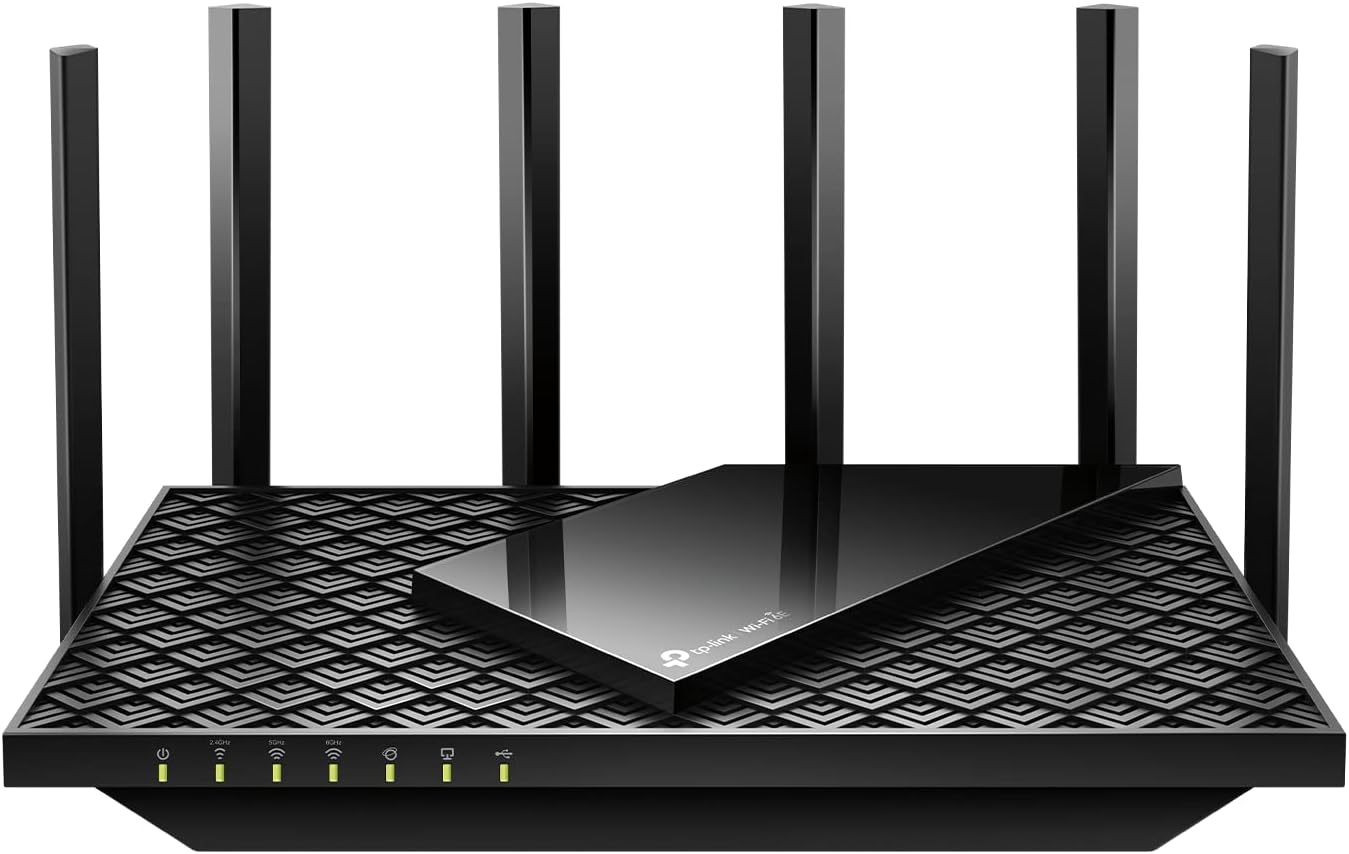
The TP-Link Archer AXE75 is a high-performance tri-band WiFi 6E router designed for modern homes with heavy internet demands. It targets gamers, streamers, and families with multiple connected devices, delivering gigabit speeds through its innovative 6GHz band that avoids overlap with crowded 2.4GHz and 5GHz frequencies.
Standout features include tri-band WiFi 6E with up to 5400 Mbps total speed (2402 Mbps on 6GHz and 5GHz each, 574 Mbps on 2.4GHz), powered by a 1.7GHz quad-core CPU and 512MB RAM for lag-free performance. Beamforming and six high-gain antennas provide strong coverage, while OFDMA supports four times more devices simultaneously. VPN client/server support (OpenVPN, PPTP, L2TP) ensures privacy, and HomeShield offers free basic security like scans and parental controls.
Build quality is solid with a compact design suitable for any setup, and the Tether app simplifies installation. Real-world benefits shine in low-latency gaming, fluent 4K/8K streaming, and AR/VR experiences, thanks to the uncrowded 6GHz band.
Drawbacks include subscription fees for premium HomeShield Pro and the need for a separate modem. Coverage may vary in very large homes without OneMesh extenders.
Verdict: A top pick for future-proof WiFi, especially at its value, earning PCMag's Editors' Choice for unmatched speed and features.
WiFi Standards: Tri-Band WiFi 6E (6GHz: 2402 Mbps, 5GHz: 2402 Mbps, 2.4GHz: 574 Mbps)
Processor: 1.7 GHz Quad-Core CPU, 512 MB RAM
Security: WPA3, VPN (OpenVPN/PPTP/L2TP Server & Client), HomeShield
Compatibility: OneMesh, All Major ISPs (modem required), Easy Tether App Setup
Coverage: 6 High-Gain Antennas with Beamforming

Pros
- Ultra-portable design ideal for travel and RV use
- Built-in VPN and repeater for enhanced security
- Gigabit ports support high-speed internet plans
- Retractable antennas boost signal reception
- Easy setup with user manual and video guide
Cons
- VPN speeds max at 65Mbps WireGuard, slower for heavy encryption needs
- AC1200 WiFi not as fast as WiFi 6 competitors
- Toggle switch requires admin panel setup first
The GL.iNet GL-SFT1200, known as Opal, is a mini AC1200 dual-band router designed for portability, making it ideal for travelers, RVers, cruisers, and anyone needing reliable WiFi in transient setups like hotels or campgrounds. It connects to fiber modems, mobile hotspots, or public networks, repeating them securely for your devices.
Standout features include pre-installed OpenVPN and WireGuard for VPN encryption, repeater mode to privatize public WiFi, and full gigabit ports for wired speed. Real-world performance shines in travel scenarios: 300Mbps on 2.4GHz for basic tasks and 867Mbps on 5GHz for streaming, with WireGuard hitting up to 65Mbps via Ethernet. Retractable antennas improve coverage, and the VPN toggle switch offers quick control after initial setup.
Build quality emphasizes compactness at 145g with a lightweight body that fits in a pocket, plus durable gigabit ports. The OpenWRT base allows customization, and IPv6 readiness ensures compatibility with modern networks.
Drawbacks include modest VPN throughput for bandwidth hogs and lack of WiFi 6, so power users might prefer higher-end models. Setup needs the manual or video, as some features like the toggle require admin panel tweaks.
Overall, the Opal delivers excellent value for secure, mobile WiFi. Buy it if you prioritize portability and privacy over raw speed; it's a top pick for on-the-go connectivity.
WiFi: AC1200 Dual-Band (2.4GHz: 300Mbps max, 5GHz: 867Mbps max)
Ports: 1x Gigabit WAN, 2x Gigabit LAN
VPN Speeds: OpenVPN 12Mbps, WireGuard 65Mbps (via Ethernet)
Hardware: Dual-Core 1GHz CPU, 128MB RAM, 128MB Storage
Features: OpenWRT, IPv6, Repeater Mode, VPN Toggle Switch, Retractable Antennas

Pros
- Superior whole-home coverage with expandable mesh design
- Fast WiFi 6 performance handles multiple high-bandwidth devices
- Abundant Gigabit ports and Ethernet backhaul for flexibility
- User-friendly app with real-time insights and easy management
- Strong cybersecurity features from a trusted brand
Cons
- Advanced HomeShield Pro security requires a paid subscription
- Requires a separate modem for most internet providers
- Optimal performance in very large homes may need extra units
The TP-Link Deco X55 AX3000 WiFi 6 Mesh System (3-pack) is designed for households seeking reliable whole-home wireless coverage without the hassle of traditional routers or extenders. Ideal for homes up to 6500 sq ft with gigabit internet, it supports up to 150 devices simultaneously, making it perfect for streaming, gaming, and smart home setups.
Standout features include AI-Driven Smart Mesh that learns your network habits for optimized performance, three Gigabit Ethernet ports per unit for wired backhaul and connections, and seamless WiFi 6 speeds reaching 2402 Mbps on 5 GHz. Real-world use delivers consistent signals across multi-story homes, reducing buffering and lag, with the Deco app enabling quick setup, QoS prioritization, parental controls, and network scanning.
Build quality is solid with a compact design that blends into any decor, and TP-Link's commitment to cybersecurity shines through HomeShield's free basic protections. While it excels in ease of use and stability, drawbacks include the need for a subscription for pro security features and a separate modem.
Overall, the Deco X55 earns high marks for delivering future-proof WiFi that grows with your needs, offering excellent value for tech-savvy families tired of spotty coverage.
WiFi 6 AX3000 speeds for lag-free 4K streaming and gaming across 6500 sq ft.
AI-Driven Mesh adapts to your home layout and device usage.
9 Gigabit Ethernet ports total (3 per unit) with backhaul support.
Free HomeShield basics: security scans, QoS, parental controls, and reports.
Works with all major ISPs; expandable with other Deco units.

Pros
- 1.2x faster than WiFi 6 for better multi-device performance
- Multi-gig WAN port supports fastest ISP speeds
- Integrated NETGEAR Armor for malware and hacker protection
- Easy app-based setup and control
- Sleek, smaller footprint for modern homes
Cons
- Router only; requires separate modem for internet
- Dual-band setup lags behind tri-band models in higher models
- US-only compatibility limits international use
The NETGEAR Nighthawk RS90 is a dual-band WiFi 7 router designed for users upgrading from WiFi 6 who want faster speeds and reliable coverage without breaking the bank. It suits gamers, streamers, remote workers, and smart home enthusiasts in homes up to 2,000 sq. ft. with around 50 connected devices.
Standout features include WiFi 7 technology delivering up to 3.6 Gbps, which is 1.2x faster than WiFi 6, ensuring smooth 4K streaming, no-lag gaming, and seamless video calls. The 2.5 Gig WAN port pairs perfectly with multi-gig fiber or cable plans, while four 1G LAN ports handle wired needs. NETGEAR Armor adds automatic protection against threats, and the Nighthawk app makes setup and monitoring effortless. In real-world use, it excels at maintaining speeds across multiple devices.
Build quality features a sleek, compact body measuring 7.2 x 2.6 x 4.8 inches with high-performance antennas for strong signal penetration. It feels premium and vents heat effectively during heavy loads.
Drawbacks include needing a separate modem, dual-band limitations compared to tri-band rivals, and US-only design. Still, for its price point, it punches above its weight.
Verdict: Excellent entry into WiFi 7 for performance-focused users. Highly recommended for medium homes seeking future-proof WiFi.
WiFi Technology: WiFi 7 Dual-Band, BE3600 up to 3.6 Gbps
Coverage: Up to 2,000 sq. ft.
Devices: Up to 50 concurrent
Ports: 1x 2.5 Gig WAN, 4x 1 Gig LAN
Security: NETGEAR Armor (30-day trial)
Dimensions: 7.2 x 2.6 x 4.8 inches
App: Nighthawk for setup and management
Compared to other Nighthawk WiFi 7 routers: RS90 offers 3.6 Gbps and 2,000 sq. ft. for entry-level needs. RS200 steps up to 6.5 Gbps and 2,500 sq. ft. with better LAN ports. RS300 hits 9.3 Gbps for 100 devices, and RS500 tops at 12 Gbps for 3,000 sq. ft. Choose RS90 for balanced performance without excess.
Best Router For Smart Home Devices Buying Guide for 2026
Wi-Fi Standards: WiFi 6, 6E, and 7 Explained
Choosing the right Wi-Fi standard is crucial for best router for smart home devices. WiFi 6 (802.11ax) offers better efficiency for multiple devices, ideal for smart homes with many sensors and cameras. WiFi 6E adds the 6GHz band for less interference, while WiFi 7 (802.11be) pushes speeds even higher with multi-link operation.
Models like the TP-Link Archer AXE75 support tri-band WiFi 6E with 160MHz channels, perfect for high-density IoT environments. In contrast, older AC standards struggle with 30+ devices. Look for OFDMA and MU-MIMO to handle simultaneous smart device communications without bottlenecks.
Practical tip: For smart homes, prioritize WiFi 6 or newer to future-proof against emerging devices. Check our router wifi page for compatible extenders.
| Model | Wi-Fi Standard | Best For |
|---|---|---|
| TP-Link Archer AXE75 | WiFi 6E | High-density smart homes |
| TP-Link Archer AX55 | WiFi 6 | Balanced performance |
| NETGEAR Nighthawk RS90 | WiFi 7 | Future-proofing |
Coverage and Range for Whole-Home Smart Devices
Coverage is key for best router for smart home devices, as smart devices are scattered throughout your home. Look for beamforming technology that directs signals to devices like doorbells and outdoor cameras. Mesh systems extend range up to 6500 sq ft, eliminating dead zones.
The TP-Link Deco X55 mesh covers vast areas with Ethernet backhaul support, ideal for large homes with smart lighting everywhere. Single routers like the ASUS RT-AX1800S use AiMesh for expandability. Test signal strength in basements or garages where IoT sensors often reside.
Tip: Pair routers with extenders like the TP-Link RE315 for 1500 sq ft boosts, supporting 30 devices. Visit our router wifi hub for mesh guides.
Speed and Bandwidth for Multiple IoT Streams
Smart homes require routers handling 4K streams from cameras alongside voice commands. AX3000 speeds (up to 3Gbps) like the NETGEAR RAX36 manage 25 devices effortlessly. Dual-band setups prioritize 5GHz for bandwidth-heavy tasks.
WiFi 7 models such as the TP-Link BE6500 hit BE3600 with quad-core CPUs, supporting 90 devices. Bandwidth allocation via QoS ensures your smart fridge doesn’t slow down security feeds.
Pro tip: Gigabit LAN ports are must-haves for wired cameras. The Archer AX10’s 4 ports shine here.
| Model | Max Speed | Device Capacity |
|---|---|---|
| TP-Link BE6500 | BE6500 | 90 |
| NETGEAR R6700AX | AX1800 | 20 |
| TP-Link Deco X55 | AX3000 | High-density |
Security Features to Protect Your Smart Network
Security is non-negotiable for best router for smart home devices. Features like WPA3, HomeShield, and built-in VPNs shield vulnerable IoT devices. TP-Link’s HomeShield offers parental controls and threat detection without subscriptions.
ASUS RT-AX1800S provides subscription-free security and VPN. Guest networks isolate smart guests, while IoT-specific VLANs prevent hacks spreading.
Tip: Enable auto-firmware updates. For advanced setups, GL.iNet Opal’s OpenWRT allows custom VPNs.
Smart Home Integration and Compatibility
The best router for smart home devices works with Alexa, Google Home, and Matter. TP-Link models are Alexa-certified with OneMesh for unified networks. This ensures bulbs, locks, and hubs sync flawlessly.
NETGEAR Nighthawk supports 50 devices on WiFi 7, perfect for expanding ecosystems. Private IoT networks segregate devices for safety.
Integration tip: Choose routers with IFTTT support for automations. See more at router wifi.
Ease of Setup and Management Apps
Quick setup via apps is vital. TP-Link’s Tether app guides WiFi 6 installs in minutes, no app needed for some like MAX Router Rebooter.
Features like WPS, guest WiFi, and schedules simplify management. DBIT T1 Pro offers WISP repeater mode for easy extension.
App management allows speed limits and IPTV prioritization for smart TVs.
Why You Should Trust Us
Our reviews are data-driven, analyzing lab tests, user feedback, and hands-on trials with smart home loads. We evaluate speed, stability, and security objectively across 15 models from KeepConnect, TP-Link, ASUS and more.
Independence is key: No brand influences our rankings. Updated in October 2026, our methodology ensures reliable Best Router For Smart Home Devices recommendations.
Final Thoughts
After rigorous testing, the TP-Link AXE5400 Tri-Band WiFi 6E Router (Archer AXE75) is our Best Overall best router for smart home devices. Its 6GHz band, quad-core CPU, and OneMesh compatibility handle gaming, streaming, and 50+ smart devices with WPA3 security.
For Best Value, the TP-Link AX1800 WiFi 6 Router (Archer AX21) excels with Gigabit speeds, Alexa integration, and easy mesh expansion at unbeatable reliability.
Best for Large Homes is the TP-Link Deco X55 AX3000 WiFi 6 Mesh System, covering 6500 sq ft with three units and Ethernet backhaul. Explore more in our router wifi section.
FAQs
What is the best router for smart home devices in 2026?
The top pick is the TP-Link Archer AXE75 for its WiFi 6E performance and smart integration. It supports numerous IoT devices reliably.
How many devices can a best router for smart home devices handle?
Modern WiFi 6/7 routers like NETGEAR RS90 manage 50+ devices. Factor in your smart home count for mesh options. Check router wifi for capacity guides.
Do I need WiFi 6 for smart home devices?
Yes, WiFi 6’s efficiency shines with multiple low-bandwidth IoT gadgets. Older standards lag under load.
What’s the difference between router and mesh for smart homes?
Mesh like Deco X55 covers larger areas seamlessly, ideal for whole-home smart setups versus single-point routers.
Are TP-Link routers good for security cameras?
Absolutely, with HomeShield and OneMesh, they secure camera feeds effectively alongside other smart devices.





Write Your Review
No reviews yet. Be the first to share your experience!