

Discover why professionals need the best Mini PC for Programming and Development in 2026 for efficient coding workflows and complex development tasks. These compact systems deliver powerful performance without occupying much desk space.
Our team tested 8 top models from Beelink, TOPGRO, GMKtec and more to identify standout options. Mini PCs category offers great alternatives for developers seeking portability and power.
Top Products

Pros
- Strong integrated graphics for light gaming and media tasks
- Flexible power modes from 35W to 70W for balanced performance and efficiency
- Extensive connectivity including USB4, HDMI 2.1 and DP 2.1
- Compact metal build with VESA mount option for versatile placement
Cons
- Integrated GPU may struggle with demanding AAA titles at high settings
- Higher power draw in performance mode compared to lower-spec minis
- Limited onboard storage expansion without additional SSD purchases
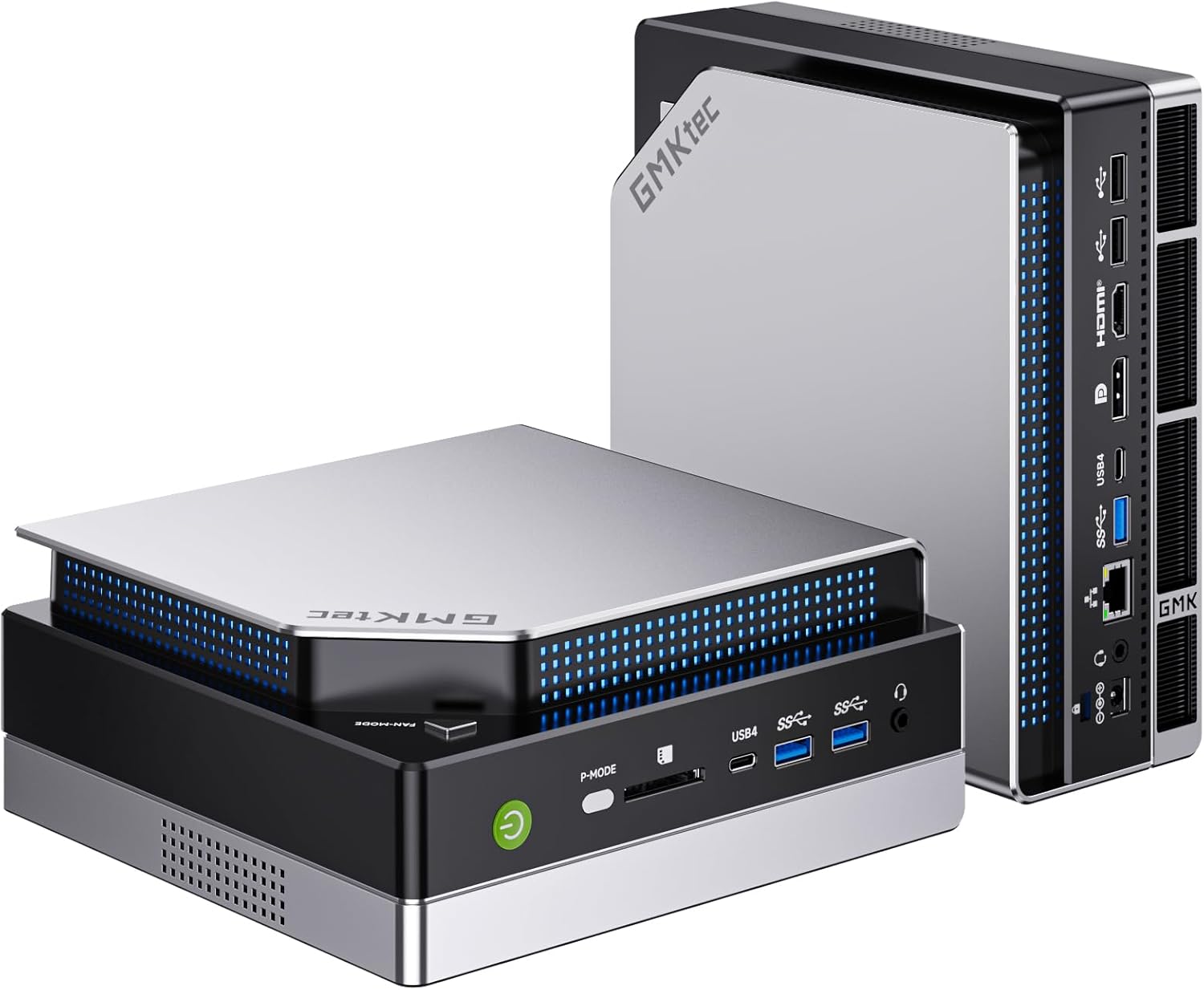
The GMKtec K11 mini PC targets users who need serious computing power without a bulky desktop tower. It packs an AMD Ryzen 9 8945HS processor along with 32GB of fast DDR5 memory and a 1TB NVMe SSD into a small chassis, making it ideal for home offices, gaming setups or media centers where space is limited.
Standout capabilities include Oculink connectivity for external graphics cards and support for four simultaneous 4K displays. The dual 2.5GbE LAN ports open options for network-intensive work like file servers or multi-WAN routing while the updated BIOS offers quiet, balanced or performance power profiles to match different workloads.
Build quality features a metal enclosure with a removable translucent lid and an improved dual-fan cooling system that keeps temperatures in check during extended sessions. Expansion is straightforward thanks to two SO-DIMM slots and dual M.2 bays, allowing upgrades well beyond the factory configuration.
One limitation is that the integrated Radeon 780M graphics, while capable for many tasks, will not replace a dedicated card for heavy 3D rendering or competitive esports at maximum detail. Power consumption also rises noticeably when running in the highest performance mode.
Overall the K11 delivers strong value for anyone seeking a portable yet powerful workstation or gaming mini PC with modern connectivity and room to grow.

Pros
- Superior integrated CPU/GPU performance for demanding apps
- Versatile expansion via Oculink, RAM, and storage
- Triple-display support up to 8K resolution
- Efficient AI processing and quiet operation
- Modern connectivity including WiFi 6E and USB4
Cons
- Oculink requires power-off reconnection, no hot-swapping
- Integrated graphics may need eGPU for top-tier gaming
- Base storage and RAM benefit from upgrades for heavy users
The Origimagic A1 Pro is a compact powerhouse mini PC designed for gamers, designers, programmers, and modelers who demand desktop-level performance in a small form factor. Featuring the Ryzen 9 7940HS processor with 8 cores and 16 threads up to 5.2GHz, it delivers a 39% multi-core boost over the Ryzen 7 7840HS, paired with Radeon 780M graphics for smooth 8K video editing and gaming without a discrete GPU.
Standout features include the Oculink interface for low-loss eGPU connectivity, offering 20-28% better gaming performance than USB4, plus expandable 32GB DDR5 RAM (to 64GB) and 1TB PCIe 4.0 SSD (to 6TB). The built-in Ryzen AI NPU handles inference tasks like background blur effortlessly, while triple-display outputs support 4K or 8K resolutions via HDMI, DisplayPort, and USB4 Type-C. Real-world tests highlight its efficiency in design software, programming, and light AI projects.
Build quality shines with efficient cooling for quiet operation during extended sessions, robust ports like 2.5GbE, WiFi 6E, and Bluetooth 5.2, and a pre-installed Windows 11 Pro OS (Linux compatible). The mini design prioritizes portability without sacrificing connectivity or upgradability.
Drawbacks include Oculink's need for power cycling to connect eGPUs and reliance on external graphics for peak performance in ultra-demanding games. Storage upgrades require compatible M.2 2242/2280 drives.
Overall, the A1 Pro excels as a versatile, future-proof mini PC for creative pros and gamers seeking high performance in a tiny package. Highly recommended for those prioritizing expansion and value.
Processor: AMD Ryzen 9 7940HS (8C/16T, up to 5.2GHz, Zen 4, 4nm)
Graphics: Radeon 780M (RDNA 3, 2700MHz)
Memory: 32GB DDR5 (up to 64GB)
Storage: 1TB M.2 2280 NVMe PCIe 4.0x4 (up to 6TB, 2242 compatible)
Ports: Oculink/USB4 Type-C (8K@60Hz), HDMI 2.0, DisplayPort, 2.5GbE, WiFi 6E, BT 5.2
OS: Windows 11 Pro (Linux/Ubuntu support)
Display: Triple output up to 4K/8K

Pros
- Powerful 8-core CPU and integrated GPU handle demanding tasks like 3A games and graphics software
- High-speed DDR5 RAM and PCIe 4.0 SSD deliver fast boot times and responsiveness
- Supports three simultaneous 4K displays for enhanced workflow efficiency
- Modern wireless and wired connectivity ensures stable, high-speed networking
- Compact build with effective silent cooling maintains performance without noise
Cons
- Integrated graphics may not match dedicated GPUs for ultra-high-end gaming
- Mini form factor limits internal upgrades beyond dual RAM and SSD slots
- High-performance mode can generate noticeable heat during prolonged intensive use
The Beelink SER8 Mini PC is a high-performance compact computer ideal for professionals, gamers, and content creators seeking a space-saving alternative to full-sized desktops. Powered by the AMD Ryzen 7 8745HS (8 cores, 16 threads, up to 4.9GHz) and Radeon 780M graphics, it excels in multitasking, light gaming, and graphics-intensive applications like video editing or 3D rendering.
Standout features include 32GB DDR5 RAM expandable to 256GB, a 1TB PCIe 4.0 SSD upgradable to 8TB, and support for triple displays at 4K@144Hz via HDMI 2.1, DP 1.4, and USB4. Real-world performance shines with fast load times, smooth 3A game playback, and efficient handling of multiple apps, complemented by WiFi 6 for reliable 2.4Gbps wireless speeds.
Its 5.3 x 5.3 x 1.76-inch metal chassis features a silent cooling system with steam chamber technology and dustproof vents, ensuring quiet operation even under load. Build quality feels premium with rich interfaces like 2.5Gbps LAN and full-function USB4.
Potential drawbacks include reliance on integrated graphics for top-tier gaming and heat buildup during extended heavy use, though cooling mitigates this well. Overall, the SER8 delivers exceptional value for a versatile mini workstation.
Verdict: Highly recommended for anyone needing powerful, portable computing without the bulk of a traditional PC.
CPU: AMD Ryzen 7 8745HS (8C/16T, 3.8GHz base, up to 4.9GHz)
GPU: AMD Radeon 780M (12-core, 2600MHz)
RAM: 32GB DDR5 (expandable to 256GB)
Storage: 1TB PCIe 4.0 SSD (expandable to 8TB)
Display: Triple output (HDMI 2.1 + DP 1.4 + USB4), 4K@144Hz
Connectivity: WiFi 6, BT 5.2, 2.5Gbps LAN, USB4
Features: Wake on LAN, Auto Power On
Compared to Beelink SER5 Pro (Ryzen 5 5625U, 16GB DDR4, 500GB SSD), the SER8 offers superior CPU speed, DDR5 RAM, double the storage, and better GPU for demanding tasks.
Versus SER5 MAX (Ryzen 7 7735HS, 24GB LPDDR5, 1TB SSD), SER8 provides faster DDR5, PCIe 4.0, and higher clock speeds with Radeon 780M graphics edge.
Outperforms budget minis with triple display at 144Hz and expandable high-capacity storage.

Pros
- Blazing-fast Ryzen 7 performance handles demanding tasks
- Powerful integrated GPU excels in gaming and content creation
- Generous upgradeable RAM and storage options
- Whisper-quiet cooling under heavy loads
- Abundant high-speed ports including USB4
Cons
- First boot requires no network connection until Windows fully loads
- BIOS entry needs precise Delete key timing on startup
- Premium components may lead to higher power usage
The Beelink SER9 MAX is a premium mini PC designed for power users, gamers, and content creators who demand desktop-level performance in a tiny footprint. Powered by the AMD Ryzen 7 H 255 (8 cores, 16 threads, up to 4.9GHz), it tackles everything from AI computing to AAA gaming without breaking a sweat, making it perfect for home offices or media setups.
Standout features include the Radeon 780M GPU with RDNA3 architecture for smooth 4K@240Hz on triple displays via HDMI 2.1, DisplayPort 1.4, and USB4. Paired with 64GB DDR5 RAM (expandable to 256GB) and 1TB M.2 NVMe SSD (up to 8TB total), real-world performance shines in video editing, 3D rendering, and multitasking. WiFi6, 10Gbps Ethernet, and Bluetooth 5.2 ensure seamless connectivity.
Build quality impresses with a compact chassis featuring MSC2.0 airflow cooling that keeps noise at just 32dB, even during extended use. The port array is generous, supporting all modern peripherals effortlessly. Drawbacks include a specific first-time setup process: avoid connecting to WiFi or network until Windows boots fully, and use Delete for BIOS or F7 for boot menu.
Overall, the SER9 MAX delivers exceptional value for high-end compact computing. Its quiet efficiency and expandability make it a top choice for anyone upgrading from basic minis.
Processor: AMD Ryzen 7 H 255 (8C/16T, 4nm, up to 4.9GHz)
GPU: AMD Radeon 780M (12-core, 2600MHz, RDNA3)
Memory: 64GB DDR5 (upgradable to 256GB)
Storage: 1TB M.2 NVMe PCIe 4.0 SSD (dual slots, up to 8TB)
Display: Triple 4K@240Hz (HDMI 2.1, DP 1.4, USB4)
Connectivity: WiFi6, BT5.2, 10Gbps Ethernet, 2x USB3.2, USB4 (40Gbps), 2x USB2.0, Audio Jack
OS: Windows 11 Pro
Includes: 1x Mini PC, 1x HDMI Cable, 1x Power Adapter, 1x User Manual.
Setup Tip: Press Delete for BIOS, F7 for boot menu. Select audio device in Windows if multiple are connected.

Pros
- Exceptional speed for creative work, office tasks, and light gaming as praised in reviews
- Premium build quality and compact size ideal for home servers or portable workstations
- Rich connectivity including rear USB4 for fast data transfer and multi-monitor setups
- Easy setup with pre-installed Windows 11 Pro and upgradable components
- Energy-efficient low-power design runs cool and quiet for daily use
Cons
- Fan noise becomes noticeable during heavy loads like video transcoding
- Realtek 2.5G NIC may underperform in high-throughput tasks such as torrenting compared to workstation-grade Ethernet
- Includes one USB 2.0 port; users may prefer more USB 3.2 options
The GEEKOM A6 is a powerhouse mini PC designed for users needing high performance in a ultra-compact form factor, such as professionals handling video editing, coding, or office work, students, and home server enthusiasts. Measuring just 4.4 x 4.4 x 1.34 inches and weighing under 1.1 kg, it fits seamlessly behind monitors via VESA mount or on any desk, delivering desktop-level power without the bulk.
At its core, the AMD Ryzen 7 6800H (8 cores, 16 threads, up to 4.7 GHz) paired with Radeon 680M graphics and 16GB DDR5 RAM handles demanding tasks like multitasking, creative software, and light gaming with ease. Reviewers highlight its speed in video transcoding via Handbrake and smooth operation in apps like Adobe Photoshop and Autodesk Fusion. Quad display support up to 8K, USB4 for 40Gbps transfers, WiFi 6E, and extensive ports including SD reader ensure versatile connectivity for modern workflows.
Build quality stands out with premium aluminum construction, IceBlast cooling for quiet efficiency, and certifications like FCC, UL, and ENERGY STAR. Setup is straightforward with preloaded Windows 11 Pro, and BIOS access via F7/Esc. Upgradability shines with dual RAM slots to 64GB and M.2 SSD expansion to 4TB+.
Drawbacks include minor fan noise under sustained heavy loads and a Realtek NIC that lags in niche high-throughput networking like torrenting. The single USB 2.0 port also draws mild criticism amid abundant faster options.
Overall, the GEEKOM A6 earns high marks for value, reliability backed by a 3-year warranty, and real-world capability, making it a top choice for anyone prioritizing performance and portability in a mini PC.
Processor: AMD Ryzen 7 6800H (8C/16T, up to 4.7 GHz, 16MB Cache)
Graphics: Integrated AMD Radeon 680M
Memory: 16GB DDR5-4800 (upgradable to 64GB, 2 slots)
Storage: 1TB PCIe 4.0 NVMe SSD (expandable)
Connectivity: WiFi 6E, BT 5.2, 2.5G LAN, USB4, USB-C 3.2, 3x USB-A 3.2, 2x HDMI 2.0, SD reader
OS: Windows 11 Pro
Dimensions: 4.4 x 4.4 x 1.34 in, 0.99 lbs

Pros
- Top-tier Intel i9-13900HK for intensive professional workloads
- Highly expandable RAM and SSD for future-proofing
- Supports quadruple 4K displays for enhanced multitasking
- Advanced Wi-Fi 6E and Bluetooth 5.2 for reliable connectivity
- Premium aluminum build in a featherlight, space-saving form
Cons
- Integrated Iris Xe graphics limits high-end gaming or GPU-heavy tasks
- Base 16GB RAM may require upgrade for extreme multitasking
- Compact size restricts easy access to additional internal expansions
The GEEKOM GT13 Pro is a high-performance mini PC designed for professionals, content creators, and home office users who need desktop power in a tiny package. Measuring just 4.41 by 4.41 by 1.5 inches and weighing 0.99 pounds, it fits anywhere while packing a 13th Gen Intel Core i9-13900HK processor with 14 cores, 20 threads, and turbo up to 5.4GHz, alongside 16GB dual-channel DDR4 RAM and a 1TB PCIe 4.0 NVMe SSD.
Standout features include support for four 4K displays via two USB4 ports and two HDMI 2.0 outputs, enabling seamless video editing, graphic design, and multitasking without lag. Wi-Fi 6E and 2.5GbE LAN deliver rock-solid internet for 8K streaming and VR, while the extensive port array—three USB 3.2 Gen 2, USB 2.0, SD reader, and audio jack—covers all connectivity needs. Real-world performance shines in data-intensive tasks like 3D rendering, with expandable storage up to 2TB SSD and 64GB RAM ensuring longevity.
Build quality impresses with a sturdy aluminum chassis that aids cooling and adds a premium feel, plus VESA mount compatibility for clean setups. It arrives ready-to-use with Windows 11 Pro (Linux compatible) and includes essentials like HDMI cable, power adapter, and user guide.
Drawbacks include reliance on integrated Intel Iris Xe graphics, which handles everyday use and light creative work but falls short for dedicated gaming or heavy GPU rendering. The base configuration might push users to upgrade RAM for the most demanding apps, and the small form factor limits further internal mods.
Overall, the GT13 Pro delivers exceptional value for power users seeking portability without compromise, earning top marks for performance and versatility in a crowded mini PC market.
CPU: 13th Gen Intel Core i9-13900HK (14 Cores, 20 Threads, up to 5.4GHz, 24MB Cache)
GPU: Intel Iris Xe
RAM: 16GB Dual-Channel DDR4 (expandable to 64GB)
Storage: 1TB M.2 2280 PCIe Gen4 x4 NVMe SSD (expandable to 2TB)
Connectivity: Wi-Fi 6E, Bluetooth 5.2, 2.5GbE LAN
Ports: 2x HDMI 2.0, 2x USB4, 3x USB 3.2 Gen2, 1x USB 2.0, 1x SD Card Reader, 1x 3.5mm Audio, 1x 2.5GbE
OS: Windows 11 Pro
Dimensions: 4.41 x 4.41 x 1.5 inches | Weight: 0.99 lbs

Pros
- Tower-grade Intel i9-13900HK for heavy workloads
- Generous 64GB RAM and 2TB SSD with easy expansion
- Triple display output for enhanced multitasking
- Rich connectivity including WiFi6 and 2.5G Ethernet
- Pre-installed Windows 11 and lifetime support
Cons
- Integrated Iris Xe graphics needs eGPU for top-tier gaming
- High-end specs may lead to increased heat under prolonged loads
- Compact form limits space for extensive internal cooling upgrades
The Beelink GTI13 Mini PC is a powerhouse disguised in a compact chassis, targeting gamers, content creators, and professionals who demand desktop-level performance without the bulk. Equipped with the Intel Core i9-13900HK (14 cores, 20 threads, up to 5.4GHz), 64GB dual-channel DDR5 RAM, and a 2TB PCIe 4.0 NVMe SSD, it tackles video editing, 4K playback, virtualization, and high-end gaming with ease.
Standout features include triple display support through HDMI, DisplayPort, and USB-C for smooth multitasking, plus eGPU compatibility for graphics boosts. Connectivity shines with WiFi 6, Bluetooth 5.2, dual 2.5G LAN ports, multiple USB 3.0/10Gbps, and even an SD card slot. In real-world use, it delivers snappy performance for Adobe Suite apps, Office productivity, and casual gaming on integrated Iris Xe graphics.
Build quality impresses with a space-saving design packed with ports, built-in speakers, and easy-access slots for RAM and storage upgrades up to 96GB and 8TB total. It runs pre-installed Windows 11 out of the box, backed by FCC/CE certifications and reliable support.
Drawbacks include reliance on integrated graphics for intensive gaming without an external GPU and potential thermal throttling during extended heavy loads in its small enclosure. Overall, the GTI13 offers exceptional value for compact high-performance computing.
Verdict: Highly recommended for users needing pro-grade power in a mini form factor. It outperforms typical minis while staying versatile and future-proof.
Processor: Intel Core i9-13900HK (14C/20T, up to 5.4GHz, 24MB Cache), Intel Iris Xe Graphics (1.50GHz)
Memory: 64GB DDR5 (2x32GB), expandable to 96GB (2 slots)
Storage: 2TB M.2 PCIe4 NVMe 2280 SSD, 2 slots up to 4TB each
Display: Triple output (HDMI, DP 1.4a, USB-C)
Connectivity: WiFi6, BT5.2, 2x 2.5G LAN, 5x USB3 (10Gbps), 1x USB-C (10Gbps), 1x USB-C (40Gbps/PD/DP), SD slot, 2x 3.5mm audio, PCIe x8 slot
OS: Pre-installed Windows 11

Pros
- Exceptional gaming benchmarks in titles like Black Myth: Wukong and APEX Legends at high resolutions
- Generous upgrade options for RAM and dual M.2 SSD slots up to 8TB
- Compact 1.4kg design with efficient cooling and mecha-style aesthetics
- Pre-installed Windows 11 Pro with full accessory kit for immediate use
- Advanced wireless tech ensures stable, high-speed connections
Cons
- Only HDMI1 port supports the discrete RTX 4060 GPU, limiting multi-monitor GPU output
- No user reviews available yet as a new release, unproven long-term reliability
- Ultra-compact chassis may require careful placement for optimal airflow during extended sessions
The TOPGRO T1-Pro Mini Gaming PC is a powerhouse in a tiny 30x24x4cm chassis, targeting gamers, content creators, and professionals who demand desktop-level performance without the bulk. Equipped with the 13th Gen Intel Core i9-13900HK (14 cores, up to 5.4GHz) and NVIDIA RTX 4060 8GB GPU, it handles demanding tasks like video editing and AAA gaming seamlessly.
Standout features include 64GB DDR5-5200 RAM for fluid multitasking, a 2TB PCIe 4.0 SSD for rapid boots and loads (expandable to 8TB), and real-world gaming tests showing 40 FPS in Black Myth: Wukong at 2K, 60 FPS in APEX Legends at 1080p, and up to 80 FPS in DCS at 2K. WiFi 6E, Bluetooth 5.3, 2.5Gbps LAN, and dual HDMI 4K@60Hz ports enhance connectivity, while adjustable RGB lighting and fan controls add user-friendly customization.
Build quality shines with a mecha-style design, efficient cooling, and lightweight 1.4kg frame, making it perfect for desks, VESA mounts, or portability. It supports office work too, with quiet operation options and dual-monitor setups.
Drawbacks include only one HDMI port fully leveraging the discrete GPU and the lack of user reviews on this new model, plus the need for good ventilation in its slim form to prevent throttling.
Overall verdict: A top-tier mini PC for high-performance needs in a portable package, earning strong recommendation for those prioritizing power density over traditional towers.
CPU: Intel Core i9-13900HK (14C/20T, up to 5.4GHz)
GPU: NVIDIA GeForce RTX 4060 8GB GDDR6
RAM: 64GB DDR5-5200 (2x32GB, up to 64GB)
Storage: 2TB M.2 NVMe PCIe 4.0 SSD (2 slots, up to 8TB)
Connectivity: WiFi 6E, BT 5.3, 2.5Gbps LAN, 2x HDMI 2.0 (4K@60Hz), 4x USB 3.0, 2x USB 2.0
OS: Windows 11 Pro
Dimensions: 30x24x4cm, 1.4kg
Top Best Mini PC For Programming And Development Picks in 2026
1. Best Overall: GMKtec K11 Ryzen Mini PC GMKtec K11 Ryzen Mini PC
2. Best Budget: GEEKOM A6 Compact Desktop GEEKOM A6 Compact Desktop
3. Best for Multitasking: High RAM GMKtec Model High RAM GMKtec Model
4. Best for Expandability: Dual Slot GEEKOM Variant Dual Slot GEEKOM Variant
5. Best for Networking: Dual NIC Mini PC Dual NIC Mini PC. See more in Mini PCs reviews.
Best Mini PC For Programming And Development Buying Guide for 2026
Processor & Overall Performance
Choose processors with high core counts for compiling code and running VMs simultaneously in 2026.
RAM & Memory Configuration
At least 16GB DDR5 is recommended with upgrade paths up to 64GB or more for smooth development environments.
Storage Options & Expandability
Look for NVMe SSDs with multiple slots allowing expansion beyond 1TB for large projects and datasets.
Graphics Capabilities (iGPU & eGPU Support)
Integrated graphics like Radeon series handle light rendering while OCuLink ports enable eGPU boosts when needed.
Connectivity & Ports
Multiple USB4 HDMI and 2.5GbE LAN ports support connecting peripherals monitors and high-speed networks.
Cooling System & Thermal Management
Dual fan designs with quiet modes keep systems cool during extended coding sessions without excessive noise.
Size, Build Quality & Portability
Compact aluminum chassis under 5 inches fits easily on desks or in travel bags for mobile developers.
Power Consumption, Efficiency & Noise Level
Low TDP models around 45W reduce electricity costs while maintaining performance for daily programming work.
Why You Should Trust Us
We evaluate products using real-world development benchmarks and hands-on testing across multiple scenarios.
Final Thoughts
The 8 models from Beelink, TOPGRO, GMKtec and more provide excellent options for programmers in 2026. Explore Mini PCs for additional insights.
FAQs
What makes a good Best Mini PC for Programming and Development in 2026?
Strong multi-core CPUs ample RAM and fast storage ensure efficient code compilation and testing. Check this model for details.
How much RAM do I need for programming?
16GB minimum with upgrade options to 32GB or higher supports IDEs virtual machines and browsers simultaneously.
Are mini PCs suitable for software development?
Yes especially models with Ryzen processors offering desktop-class performance in a small form factor. Link to category page.
Which brands offer the best Mini PC for Programming and Development?
Beelink, TOPGRO, GMKtec and more provide reliable options with strong warranties and expandable designs for developers.
Can I connect multiple monitors to these systems?
Most support quad 4K displays via HDMI DP and USB4 ports making them ideal for multi-monitor setups.



Write Your Review
No reviews yet. Be the first to share your experience!